Thursday, September 3, 2009

Protection against packet sniffers

Share Orkut

Some while back when I was using a SIFY Broadband connection, there was this particular period when all transfers on LAN as well as net speeds dropped drastically. I felt very weird about the fact that this happened almost every day at around 6pm. There was only one cause I knew of (mentioned in the previous post), which could have such an effect; someone is doing a MITM or Man in the Middle attack.


So how do we detect these guys?

Firstly I have only tried this trick in my network, I'm not sure it will work with you; but you can still give it a try.

  • Start a sniffer like Wireshark, sniff for some time when you think the attack is being carried out. Now from the captured packets, separate out the DNS request packets and search for reverse DNS lookups. If at all there's an attacker who is sniffing or doing a MITM, there are bound to be reverse DNS lookups, either by the application or manually.
  • If any system on a network responds to a ARP request that is sent to a non-broadcast address, that means that the system is clearly in promiscuous mode.
  • Later on I found this handy tool XArp http://www.chrismc.de/developing/xarp/.
  • Also on a windows machine command prompt the "arp –a" command will show you your ARP entries, and "arp –d *" command will delete all entries in your ARP table.

Tuesday, September 1, 2009

Cain and Abel – Hacking Local Area Networks

Share Orkut

This is another tool that is favored in extracting or recovering passwords. Note very carefully, Cain and Abel is a "PASSWORD RECOVERY" tool, use it carefully.

(THIS POST IS FOR EDUCATIONAL USE ONLY)

Before I start, there are a few requirements.

  • Download Cain and Abel from www.oxid.it
  • Should have a switched LAN. (Most ISPs other than BSNL provide broadband via LAN, e.g. SIFY, HATHWAY, local Cable internet connections)
  • Any Microsoft Windows Operating System.

If you are not sure about being on a switched network, continue the steps, until you find out.

  1. Download and install Cain and Able from the link given above.
  2. Start Cain and Abel (requires admin privileges in Vista), go to the sniffer tab, click on the configure menu, select your NIC, check 'start sniffer on startup', press 'OK'.
  3. Click on the 'Start / Stop Sniffer' (the 2nd) button on the toolbar. Now click the blue '+' (plus) sign (this is the 7th button on the toolbar). Check 'All Tests' and click 'OK'.
  4. After the scan is complete, if you are on a switched network then, you must be able to see many IP and MAC addresses in this pane. If you don't see any IP other than your own, probably you are not on a switched network.
  5. Notice the tabs on the bottom, HOSTS, APR, Routing, Passwords, and VoIP. You are currently on the HOSTS tab, select the APR tab click on the 'top pane' and click the 'blue +' (7th on toolbar).
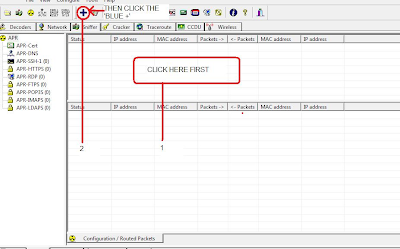


  6. Now you will again see the IP & MAC address (in the left pane) you saw in Step 5. From this list, select your 'Gateway IP', (this will mostly be something like 192.xxx.xxx.1 or 10.xxx.xxx.1 etc; check your network properties for more info on gateway.) after selecting your 'Gateway IP Address' (now some IP will appear on the right); drag and select all the entries in the right pane, and click 'OK'.
  7. Now click on the 'Start/Stop APR' (the 3rd) button on the toolbar. You will see 'HALF ROUTING' and 'FULL ROUTING' entries in the lower pane.
  8. Now go to the Passwords tab on the bottom. Slowly you will see passwords appearing in this section; most will be under HTTP.


The password section gives you full details on the capture, including Username, password, URL, etc. Any person who was online during the time you completed Steps 3 – 5, will be affected, and you will have access to their passwords.


Beware: What this program does is send all the traffic through your computer, so the LAN speeds slow down drastically. On my home network, LAN transfer speeds reduced from 10MB/s to 100Kb/s in 10 minutes.


Also according to me, any network can be efficiently analyzed with a combination of 'Cain and Abel' (http://www.oxid.it/cain) and 'Wireshark' (http://www.wireshark.org/).

Saturday, August 29, 2009

Qumana – Blog Editor

Share Orkut

I haven't used any blog editor other than the default editor in blogger and MS Word. I had done a search for a blog editor a while ago, but never came across Qumana, until yesterday. Qumana needs Java Runtime Environment installed before you consider installing Qumana. I wanted a editor which would help me post the blog-post without having to sign up at blogger using a browser and editing it over there, (this happens to me at month ends when I desperately try to save some bandwidth), I also wanted a spell checker for proof reading my post. Qumana satisfies all requirements and as an added benefit, it can even integrate AdGenta adverts into your blog-post.

Features:

  • Supports a lot of blog providers including Blogger, Wordpress, TypePad, DairyLand, SquareSpace, Drupal, MSN Space, LiveJournal, etc.
  • Qumana supports AdGenta adverts, which can be inserted by you into your post while editing the post itself.
  • Can manage multiple blogs from the same provider or by multiple providers.
  • Allows editing in multiple modes, i.e. the WYSIWYG mode or the HTML mode.
  • Inserting images and videos is made very simple.
  • Can insert tags and track backs, allow or disallow trackbacks or comments.
  • Has a spell check utility, so that you can correct your mistakes before publishing.
  • One click publish.
  • It can also set the time of posting.

Bummer:

I agree this is a pretty good blog-editor but I loved a feature in MS Word where simple mistakes like capitalization gets corrected automatically, Qumana with its 'spell check as you type' feature comes very close.


Get Qumana at http://www.qumana.com/

Thursday, August 27, 2009

AutoIt Scripting

Share Orkut

A freeware scripting language for the Microsoft Windows platform, which uses keystrokes, mouse movements, window manipulation among others to automate tasks in the windows. This little handy tool does not require any runtimes and will run on most machines without much hardware requirements.

Some of the notable features of AutoIt are:

  • Very easy to learn and understand syntax.
  • Scripts can be compiled into standalone executables.
  • Creation of GUI is very easy.
  • Direct call to DLL functions and windows API.
  • Supports Windows 95, 98, ME, NT4, 2000, XP, VISTA.
  • Detailed help file with examples of code.

If you can't find a use for AutoIt scripts, then I'd like to tell you to go and get a brain.

Wednesday, August 26, 2009

Nmap-online.com – Nmap on the internet

Share Orkut

I had installed Nmap yesterday to scan a particular target of interest to me, but unfortunately I was getting certain errors about Nmap being unable to find the network adaptor, and I couldn't find a way to make it work. A quick Google search revealed this wonderful online Nmap port scanner, www.nmap-online.com

The interface is intuitive, the default option when the website loads is to quick scan your own computer, full Nmap scans of your own system and custom scans, which allow you to scan custom targets with your own parameters are also included, it keeps your scan requests on queue and lets you know the number of requests before it on queue. When I used it last night, there weren't any other requests so I got my results pretty fast and even if there are many requests it has the option of e-mailing the results of the scan to your own e-mail id.

Whats more is, this service may keep your scan anonymous from the target, if he has surveillance installed.